cipherdyne.org | System and Network Security2024-02-29T16:26:04-05:00Michael Rashhttp://www.cipherdyne.org/images/favicon.ico/images/favicon.icohttp://www.cipherdyne.org/
perl
Software Release: fwknop-2.6.11Michael Rashhttp://www.cipherdyne.org/blog/2024/02/software-release-fwknop-2.6.11.html2024-02-06T21:01:30-05:002024-02-06T21:01:30-05:00
The 2.6.11 release of fwknop is available for
download (or via the
github release tag).
Here is the complete
ChangeLog:
[server] (Amin Massad) Fixed two bugs in PF handling code - one for
indefinitely repeating error messages "Did not find expire comment in
rules list 0" in rule deletion code, and the second where min_exp was
not computed correctly for min_exp equal to zero. See github issue #295.
[server] Add ALLOW_ANY_USER_AGENT for ENABLE_SPA_OVER_HTTP mode so that
fwknopd will accept any User-Agent string coming from the client. By
default this is disabled, so only SPA packets with a User-Agent string
that begins with 'Fwknop' will be accepted. Just set this variable to
'Y' to override this. Then, on the fwknop client command line, use the
--user-agent option to specify any desired User-Agent string. This
feature was added to close issue #296 reported by github user
@fishcreek.
[AppArmor] (Francois Marier) Various fixes to the AppArmor profile to
support recent versions of Debian and Ubuntu.
[test suite] Add gpg.conf and gpg-agent.conf to set 'pinentry-mode
loopback' to restore GPG full cycle tests. This works with GPG 2.2.27 on
Ubuntu 22.04 for example.
[test suite] Prefer the 'ip' command over the older 'ifconfig' command
for interface operations and loopback detection.
[test suite] Update the 'spa_fuzzing.py' fuzzer to use Python3.
Wireguard, macOS, and Linux Virtual MachinesMichael Rashhttp://www.cipherdyne.org/blog/2018/10/wireguard-macos-and-linux-virtual-machines.html2018-10-06T21:01:30-05:002018-10-06T21:01:30-05:00
(The primary material for this blog post was
released on github. I'm reproducing
part it here as a blog post.)
Over the long term, the Wireguard VPN is set to send shockwaves
through the VPN community with its modern cryptographic design, performance, stealthiness against
active network scanners, and commitment to security through a minimally complex code base. It is
my belief that these characteristics firmly place Wireguard among the best VPN options available.
Over time, it is likely that commercial solutions will be developed around Wireguard similarly to
commercial wrappers around OpenVPN.
This repository is dedicated to deploying a Wireguard VPN on macOS via a Linux VM running
under a virtualization solution such as Parallels. There are many alternatives to this
approach - including omitting the Linux piece altogether and using the cross-platform macOS
Wireguard tools - but I'm interested in using the
Wireguard kernel module from a Mac. This has to be done from a Linux VM or container, and we'll
talk about the VM route in this write up.
The primary use case for running such a VPN solution is to provide security for network traffic
emanating from a Mac laptop that is connected to a potentially hostile wireless network. This
includes the network at the local coffee shop among many others. Nothing against coffee shops of
course (I love coffee), but they are in the business of making wonderful caffeinated potions - not
hardening their network infrastructure against adversaries. In terms of general threats to network
traffic, a properly deployed VPN allows you to shift much of the security burden to the other side
of the VPN. In this case, the remote Wireguard end point will be deployed in a major cloud provider
or ISP network. The security of, say, Google's GCE network or Amazon's AWS network is far higher
than the network of the local coffee shop.
Note macOS security is a broad topic, and this repository is meant only to discuss a VPN
solution based on Wireguard. For a comprehensive treatment of macOS security, including other
VPN options, see the excellent
macOS Security and Privacy Guide.
Prerequisites
To fully implement Wireguard in this manner, we'll assume the following:
An Ubuntu Linux VM is running under Parallels on a Mac laptop. Wireguard will run from
this VM, and will constitute the "client" side of the VPN.
The Mac laptop will be connected wirelessly to the network at the local coffee shop, and
have an IP assigned via DHCP as usual.
The "server" side of the Wireguard VPN is an Ubuntu system running on a major cloud
provider with an Internet-facing IP address.
Wireguard has been [installed](https://www.wireguard.com/install/) on both Ubuntu VM's,
and key pairs have been [generated and shared](https://www.wireguard.com/quickstart/).
Wireguard client - Mac laptop hostname and IP addresses:
Mac laptop hostname: maclaptop
Mac laptop wireless IP on the coffee shop network: 192.168.0.54, interface: en0
Mac laptop virtual NIC IP (under Parallels): 10.211.44.2, interface: vnic0
Mac laptop Ubuntu VM Wireguard hostname: wgclientvm, IP: 10.211.44.31
Mac laptop Ubuntu VM Wireguard IP: 10.33.33.2, interface: wg0
Wireguard server - Ubuntu system hostname and IP addresses:
Hostname: wgserver
IP: 1.1.1.1, interface: eth0
Wireguard IP: 10.33.33.1, interface: wg0
Graphically, the network setup looks like this:
For the remainder of the writeup, head on over to the
github repository.
The 2.6.10 release of fwknop is available for
download (or via the
github release tag).
Here is the complete
ChangeLog:
[server] Add MAX_FW_TIMEOUT to access.conf stanzas to allow a maximum
number of seconds for client-specified timeouts in SPA packets. This
fixes issue #226 which was spotted by Jeremiah Rothschild.
[server] Bug fix in CMD_EXEC mode to make sure to call exit() upon any
error from execvpe(). Without this fix, additional fwknopd processes
would be started upon a user specifying a command without the necessary
permissions. This bug was reported by Stephen Isard.
[build] Jérémie Courrèges-Anglas and Ingo Feinerer contributed a patch
to fix endian detection on OpenBSD systems based on information
contained here: https://www.opengroup.org/austin/docs/austin_514.txt
[client/server] (Michael Stair) Added client and server infrastructure
written in Erlang. See the erlang/ directory.
Software Release: psad-2.4.6 and fwsnort-1.6.8Michael Rashhttp://www.cipherdyne.org/blog/2018/07/software-release-psad-2.4.6-and-fwsnort-1.6.8.html2018-07-31T21:01:30-05:002018-07-31T21:01:30-05:00
A pair of software releases is available for download -
psad-2.4.6 and fwsnort-1.6.8.
The main change is that now both pieces of software support the Snort 'metadata'
keyword. This keyword and associated field is a common fixture of modern Snort rule
sets, and usually contains important data such as IPS policy preferences, information
about vulnerable target software or OS, date created, and more.
As an example, when fwsnort detects TCP traffic over port 21 that matches the Snort rule
"ET ATTACK_RESPONSE FTP inaccessible directory access COM2" (sid 2000500), the
following syslog message is generated:
When psad monitors this out of the syslog data, an email alert is generated as usual.
However, in this email alert the metadata 'created_at' and 'updated_at' fields are now
included as defined in the original rule:
The 2.6.9 release of fwknop is available for
download (or via the
github release tag).
Here is the complete
ChangeLog:
(Jonathan Bennett) Added support for the SHA3 "Keccak" algorithm
(specifically SHA3_256 and SHA3_512) for SPA HMAC and digest checking.
Enabling SHA3 from the fwknop client command line is done with the -m
option for the embedded SPA digest, or with the --hmac-digest-type
argument for the HMAC. On the server side, SHA3_256 or SHA3_512 can be
required for the incoming SPA packet HMAC via the HMAC_DIGEST_TYPE
configuration variable in access.conf stanzas. The SHA3 implementation
is from, Keyak and Ketje Teams, namely, Guido Bertoni, Joan Daemen,
Michael Peeters, Gilles Van Assche and Ronny Van Keer - see:
http://keyak.noekeon.org/
(Damien Stuart) Added support for libnetfilter_queue so that fwknopd can
acquire SPA packets via the NFQ target. This feature is enabled with a
new command line switch --enable-nfq-capture for the configure script,
and libpcap is not required in this mode. In support of capturing SPA
packets via the NFQ target, new configuration variables have been added
to the fwknopd.conf file: ENABLE_NFQ_CAPTURE, NFQ_INTERFACE, NFQ_PORT,
NFQ_TABLE, NFQ_CHAIN, NFQ_QUEUE_NUMBER, and NFQ_LOOP_SLEEP.
(Vlad Glagolev) Added support for deriving the source IP from the
X-Forwarded-For HTTP header when SPA packets are sent over HTTP
connections.
Bug fix in command open/close cycle feature to ensure that the first
successful match on a valid incoming SPA packet finishes all access.conf
stanza processing. That is, no other stanzas should be looked at after
the first match, and this is consistent with other SPA modes (such as
basic access requests). This bug was reported by Jonathan Bennett.
(Jonathan Bennett) Various fixes and enhancements to the test suite to
extend code coverage to new code, ensure valgrind bytes lost detection
works for amount of memory less than 10 bytes, better timing strategy
for fwknop client/server interactions, and more.
Single Packet Authorization and Third Party DevicesMichael Rashhttp://www.cipherdyne.org/blog/2015/12/single-packet-authorization-and-third-party-devices.html2015-12-23T21:01:30-05:002015-12-23T21:01:30-05:00
A major new feature in fwknop has been introduced today with the
2.6.8 release
(github tag) - the
ability to integrate with third-party devices. This brings SPA operations easily to
any device or software that offers a command line interface. By default,
the fwknop daemon supports four different firewalls: iptables, firewalld, ipfw, and PF.
But, suppose you want to have fwknopd leverage
ipset instead? Or, suppose you have an
SSH pre-shared key between a Linux system and a Cisco router, and you want fwknopd
(running on the Linux box) to control the ACL on the router for the filtering portion of
SPA? Finally, suppose that you want a stronger measure of protection for an SSH daemon
that may have been backdoored, and that runs on a
proprietary OS where fwknopd can't be deployed natively? The sky is the limit, and
I would be interested in hearing about other deployment scenarios.
These scenarios and many others are now supported with a new "command open/close cycle"
feature in fwknop-2.6.8. Essentially, fwknopd has the ability to execute an arbitrary command
upon receiving a valid SPA packet (the "open"), and then execute a different command after a
configurable timeout (the "close"). This allows fwknopd to integrate with any third-party
device or software if open and close commands can be defined for how to interact. These
commands are specified on a per-stanza basis in the access.conf file, and a set of variable
substitutions are supported such as '$SRC', '$PORT',
'$PROTO', and '$CLIENT_TIMEOUT'. Naturally, the IP address, port, and
protocol are authenticated and decrypted out a valid SPA packet - i.e., SPA packet headers
are not trusted.
Let's see an example on a Linux system ("spaserver"). Here, we're going to have fwknopd interface with
ipset instead of iptables. First, we'll create an ipset named fwknop_allow,
and we'll link it into the local iptables policy. If a packet hits the
fwknop_allow ipset and there is no matching source IP, then the DROP rule at the
end of the iptables policy implements the default-drop policy. No userspace daemon such
as SSHD can be scanned or otherwise attacked from remote IP addresses without first
producing a valid SPA packet.
With fwknopd running and iptables configured to drop everything except for IP
communications that match the fwknop_allow ipset, let's use the fwknop client
from a remote system "spaclient" to gain access to SSHD on the server for 30 seconds
(note that the iptables conntrack module will keep the connection open after the SPA
client IP is removed from the ipset). We'll assume that the encryption and HMAC keys
have been previous shared between the two systems, and on the client these keys have
been written to the "spaserver" stanza in the ~/.fwknoprc file:
[spaclient]$ fwknop -A tcp/22-a1.1.1.1-f30-n spaserver
So, behind the scenes after the SPA packet has been sent above, fwknopd on the server has
authenticated and decrypted the SPA packet, and has executed the following ipset command.
In this case, there is no need for a corresponding close command because ipset implements
the timer provided by the client itself, so the client IP is deleted from the ipset
automatically. (In other scenarios, the close command can be fully specified instead of
using the string 'NONE' as we have above.) Here are the syslog messages that
fwknopd has generated, along with the
'ipset list' command output to show the 1.1.1.1 IP as a member of the set:
[spaserver]# grep fwknopd /var/log/syslog |tail -n2
Dec 2315:38:06 ubuntu fwknopd[13537]:(stanza #1) SPA Packet from IP:1.2.3.4 received with access source match
Dec 2315:38:06 ubuntu fwknopd[13537]: [1.2.3.4] (stanza #1) Running CMD_CYCLE_OPEN command:/sbin/ipset add fwknop_allow 1.1.1.1,6:22 timeout 30
Name: fwknop_allow
Type: hash:ip,port
Revision:5
Header: family inet hashsize 1024 maxelem 65536 timeout 30
Size in memory:224
References:0
Members:
In addition to the ability to swap out the existing firewall with a completely
different filtering infrastructure, there are other notable features and fixes in the
2.6.8 release. The most important of these is a new feature implemented by Jonathan Bennett
(and suggested by Hank Leininger in github issue
#62)
that allows access.conf files to be imported via a new '%include' directive.
This can be advantageous in some scenarios by letting non-privledged users define
their own encryption and authentication keys for SPA operations. This way, users do
not need write permissions to the main /etc/fwknop/access.conf file to change keys
around or define new ones.
The complete ChangeLog is available here, and the current test suite has achieved
90.7% code coverage (measured by lines).
The 2.6.7 release of fwknop is available for
download (or via the
github release tag).
This release adds significant support for running commands delivered by SPA packets via
'sudo' on the server, and this allows the powerful 'sudoers' syntax to filter commands
that remote users are allowed to execute.
In addition, the --key-gen (key generation) mode has been added to
fwknopd. This will allow better integration with Jonathan Bennett's
Fwknop2 Android client - particularly
when only the fwknopd server is installed on a system (as is usually the case for embedded
distributions such as OpenWRT). Further, Jonathan contributed a
console QR code generator, so that fwknop encryption and HMAC keys can be imported into
the Fwknop2 Android client via the phone's camera. Here is an example:
In other news, Jonathan and I will be giving a lengthy interview on
Single Packet Authorization with fwknop for the
FLOSS Weekly show organized by the venerable
Randal Schwartz
of perl fame. Tune in September 2nd at 11am Eastern time.
As usual, fwknop has a Coverity Scan score of zero,
and the code coverage report achieved by the 2.6.7 test suite is available
here. Note that the fwknop test suite is now
achieving 90% code coverage counted by lines, and 100% code coverage counted by
functions. This reflects the commitment the fwknop project makes towards rigorous
security and testing quality.
Here is the complete
ChangeLog for fwknop-2.6.7:
[server] When command execution is enabled with ENABLE_CMD_EXEC for an
access.conf stanza, added support for running commands via sudo. This was
suggested by Github user 'freegigi' (issue #159) as a means to provide
command filtering using the powerful sudoers syntax. This feature is
implemented by prefixing any incoming command from a valid SPA packet
with the sudo command along with optional user and group requirements
as defined by the following new access.conf variables:
ENABLE_CMD_SUDO_EXEC, CMD_SUDO_EXEC_USER, and CMD_SUDO_EXEC_GROUP.
[server] Kevin Layer reported a bug to the fwknop mailing list that
simultaneous NAT access for two different access.conf stanza was not
functioning properly. After some diagnosis, this was a result of
rule_exists() not properly detecting and differentiating existing DNAT
rules from new ones with different port numbers when 'iptables -C'
support is not available. This was against iptables-1.4.7, and has been
fixed in this release of fwknop (tracked as issue #162).
[server] Added --key-gen to fwknopd. This feature was suggested by
Jonathan Bennett, and will help with ease of use efforts. The first
platform to take advantage of this will likely be OpenWRT thanks to
Jonathan.
[server] By default, fwknopd will now exit if the interface that it is
sniffing goes down (patch contributed by Github user 'sgh7'). If this
happens, it is expected that the native process monitoring feature in
things like systemd or upstart will restart fwknopd. However, if fwknopd
is not being monitored by systemd, upstart, or anything else, this
behavior can be disabled with the EXIT_AT_INTF_DOWN variable in the
fwknopd.conf file. If disabled, fwknopd will try to recover when a
downed interface comes back up.
[extras] Added a script from Jonathan Bennett at
extras/console-qr/console-qr.sh to generate QR codes from fwknopd
access.conf keys.
[build] Added --with-firewalld to the autoconf configure script. This is
a synonym for --with-firewall-cmd to avoid confusion. Some package
maintainers use --with-firewalld to build fwknop.
Android Fwknop2 Client and OpenWRTMichael Rashhttp://www.cipherdyne.org/blog/2015/06/android-fwknop2-client-and-openwrt.html2015-06-22T21:01:30-05:002015-06-22T21:01:30-05:00
Jonathan Bennett's new Android
'Fwknop2' client is ready for prime time. It is available now in the
Google Play store as well as on
F-Droid,
and Jonathan put together a nice video demonstration of Fwknop2 being used to access
SSHD on a router running OpenWRT. Also demonstrated is the usage of NAT to transparently
access SSHD running on a system behind the router. This illustrates the ability
fwknopd offers for creating inbound NAT rules for external SPA clients - something that is,
to my knowledge, unique to the fwknop in the world of SPA software. Finally, in an
innovative twist, the Fwknop2 client can read encryption and authentication keys from
a QR code via the phone's camera. This simplifies the task of getting longer keys
- particularly those that are base64-encoded - to the phone for SPA operations.
New Android Single Packet Authorization Client: Fwknop2Michael Rashhttp://www.cipherdyne.org/blog/2015/06/new-android-single-packet-authorization-client-fwknop2.html2015-06-12T21:01:30-05:002015-06-12T21:01:30-05:00
After a long while without updates to the fwknop clients on Android or iOS, I'm
excited to announce that Jonathan Bennett
has developed an entirely new client for Android called Fwknop2. This
client adds significant features such as the ability to save configurations (including
both encryption and authentication keys), proper handling of base64 encoded keys, and
support for manually specified IP addresses to be allowed through the remote firewall.
Further, Fwknop2 integrates with
JuiceSSH
so that an SSH connection can seamlessly be launched right after the SPA packet is
sent. Finally, in an interesting twist, Fwknop2 will be able to read encryption
and HMAC keys via a QR code via the camera. The QR code itself is generated from
key material in --key-gen mode (which is currently available in the standard fwknop
client and will be available in the fwknopd server in the next release).
Fwknop2 will be available on both the Google Play store and via F-Droid within
the next few hours, and in the meantime the APK is available on github
here.
Below are a couple of screenshots of the new Android client in action - these are
from an Android VM running under Parallels on Mac OS X (Yosemite):
NAT and Single Packet AuthorizationMichael Rashhttp://www.cipherdyne.org/blog/2015/04/nat-and-single-packet-authorization.html2015-04-23T21:01:30-05:002015-04-23T21:01:30-05:00
People who use Single Packet Authorization (SPA) or its security-challenged cousin
Port Knocking (PK) usually access SSHD running on the same system where the SPA/PK
software is deployed. That is, a firewall running on a host has a default-drop
policy against all incoming SSH connections so that SSHD cannot be scanned, but a
SPA daemon reconfigures the firewall to temporarily grant access to a passively
authenticated SPA client:
This works
well enough,
but both port knocking and SPA work in conjunction with a firewall, and "important" firewalls
are usually gateways between networks as opposed to just being deployed on standalone hosts.
Further, Network Address Translation (NAT) is commonly used on such firewalls (at least
for IPv4 communications) to provide Internet access to internal networks that are on
RFC 1918 address space, and also to allow external hosts access to services hosted on
internal systems.
The prevalence of NAT suggests that SPA should integrate strongly with it. Properly done,
this would extend the notion of SPA beyond just supporting the basic feature of granting
access to a local service. To drive this point home, and to see what a NAT-enabled vision
for SPA would look like, consider the following two scenarios:
A user out on the Internet wants to leverage SPA to access an SSH daemon that
is running on a system behind a firewall.
One option is to just use SPA to access SSHD on the firewall first, and then
initiate a new SSH connection to the desired internal host from the firewall itself.
However, this is clunky and unnecessary. The SPA system should just integrate with
the NAT features of the firewall to translate a SPA-authenticated incoming SSH
connection through to the internal host and bypass the firewall SSH daemon
altogether:
A local user population is behind a firewall that is configured to block all access
by default from the internal network out to the Internet. Any user can acquire an IP on
the local network via DHCP, but gaining access to the Internet is only possible after
authenticating to the SPA daemon running on the firewall. So, instead of gaining
access to a specific service on a single IP via SPA, the local users leverage SPA
to gain access to every service on every external IP. In effect,
the firewall in this configuration does not trust the local user population, and Internet
access is only granted for users that can authenticate via SPA. I.e., only those users
who have valid SPA encryption and HMAC keys can access the Internet:
(A quick note on the network diagrams above - each red line represents a connection that
is only possible to establish after a proper SPA packet is sent.)
Both of the above scenarios are supported with fwknop-2.6.6, which has been
released today. So far, to my knowledge, fwknop is the
only SPA/PK implementation with any built-in NAT support. The first scenario of gaining
access to an internal service through the firewall has been supported by fwknop for a long time, but
the second is new for 2.6.6. The idea for using SPA to gain access to the Internet
instead of just for a specific service was
proposed by "spartan1833"
to the fwknop mailing list, and is a powerful extension of SPA into the world of NAT - in
this case, SNAT in iptables parlance.
Before diving into the technical specifics, below is a video demonstration of the
NAT capabilities of fwknop being used within Amazon's AWS cloud. This shows fwknop using
NAT to turn a VPC host into a new gateway within Amazon's own border controls for the
purposes of accessing SSH and RDP running on other internal VPC hosts. So, this illustrates
the first scenario above. In addition, the video shows the usage of SPA
ghost services
to NAT both SSH and RDP connections through port 80 instead of their respective default
ports. This shows yet another twist that strong NAT integration makes possible in the SPA
world.
Now, let's see a practical example. This is for the second scenario above where a system
with the fwknop client installed is on a network behind a default-drop firewall running
the fwknop daemon, and the new SNAT capabilities are used to grant access to the Internet.
First, we fire up fwknopd on the firewall after showing the access.conf and fwknopd.conf
files (note that some lines have been abbreviated for space):
[firewall]# cat /etc/fwknop/access.conf
SOURCE                      ANY
KEY_BASE64                  wzNP62oPPgEc+k...XDPQLHPuNbYUTPP+QrErNDmg=
HMAC_KEY_BASE64             d6F/uWTZmjqYor...eT7K0G5B2W9CDn6pAqqg6Oek=
FW_ACCESS_TIMEOUT           1000
FORCE_SNAT                  123.1.2.3
DISABLE_DNAT                Y
FORWARD_ALL                 Y

[firewall]# cat /etc/fwknop/fwknopd.conf
ENABLE_IPT_FORWARDING       Y;
ENABLE_IPT_SNAT             Y;

[firewall]# fwknopd -i eth0 -f
Starting fwknopd
Added jump rule from chain: FORWARD to chain: FWKNOP_FORWARD
Added jump rule from chain: POSTROUTING to chain: FWKNOP_POSTROUTING
iptables 'comment' match is available
Sniffing interface: eth3
PCAP filter is: 'udp port 62201'
Starting fwknopd main event loop.
With the fwknopd daemon up and running on the firewall/SPA gateway system, we now run
the client to gain access to the Internet after showing the "[internet]" stanza in the
~/.fwknoprc file:
[spaclient]$ cat ~/.fwknoprc
[internet]
KEY_BASE64                  wzNP62oPPgEc+k...XDPQLHPuNbYUTPP+QrErNDmg=
HMAC_KEY_BASE64             d6F/uWTZmjqYor...eT7K0G5B2W9CDn6pAqqg6Oek=
ACCESS                      tcp/22  ### ignored by FORWARD_ALL
SPA_SERVER                  192.168.10.1
USE_HMAC                    Y
ALLOW_IP                    source

[spaclient]$ nc -v google.com 80
### nothing comes back here because the SPA packet hasn't been sent yet
### and therefore everything is blocked (except for DNS in this case)
[spaclient]$ fwknop -n internet
[spaclient]$ nc -v google.com 80
Connection to google.com 80 port [tcp/http] succeeded!
Back on the server, below are the rules that are added to grant Internet access to
the spaclient system. Note that all ports/protocols are accepted for forwarding
through the firewall, and an SNAT rule has been applied to the spaclient source IP
of 192.168.10.55:
(stanza #1) SPA Packet from IP: 192.168.10.55 received with access source match
Added FORWARD ALL rule to FWKNOP_FORWARD for 192.168.10.55 -> 0.0.0.0/0 */*, expires at 1429387561
Added SNAT ALL rule to FWKNOP_POSTROUTING for 192.168.10.55 -> 0.0.0.0/0 */*, expires at 1429387561
Conclusion
Most users think of port knocking and Single Packet Authorization as a means to passively
gain access to a service like SSHD running on the same system as the PK/SPA software itself.
This notion can be greatly extended through strong integration with NAT features in a firewall.
If the SPA daemon integrates with SNAT and DNAT (in the iptables world), then both internal
services can be accessed from outside the firewall, and Internet access can be gated by SPA too.
The latest release of fwknop supports both of these scenarios, and please email me
or send me a message on Twitter @michaelrash if
you have any questions or comments.
Single Packet Authorization Threat ModelingMichael Rashhttp://www.cipherdyne.org/blog/2015/03/single-packet-authorization-threat-modeling.html2015-03-16T21:01:30-05:002015-03-16T21:01:30-05:00
Last week there was an interesting question
posed by Peter Smith
to the fwknop mailing list that focused on running fwknop in
UDP listener mode
vs. using libpcap. I thought it would be useful to turn this into a blog post, so here is Peter's
original question along with my response:
"...I want to deploy fwknop on my server, but I'm not sure If I should use
the UDP listener mode or libpcap. At first UDP listener mode seems to be
the choice, because I don't have to compile libpcap. However, I then
have to open a port in the firewall. Thinking about this, I get the
feeling that I'm defeating the purpose of using SPA, by allowing
Internet access to a privileged processe.
If an exploitable security issue is found, even though fwknop remains
passive and undiscoverable, an attacker could blindly send his exploit
to random ports on servers he suspects running fwknopd, and after
maximum 65535 tries he would have root access. I'm not a programmer, so
I can't review the code of fwknop or SSH daemon, but if both is equally
likely of having security issues, I might as well just allow direct
access to the SSH daemon and skip using SPA.
Is my point correct?..."
First, let me acknowledge your point as an important issue to bring up. If
someone finds a vulnerability in fwknopd, it doesn't matter whether fwknopd
is collecting packets via UDP sockets or from libpcap (assuming we're
talking about a vulnerability in fwknopd itself). The mere processing of
network traffic is the problem.
So, why run fwknopd at all?
This is something of a long-winded answer, but I want to be thorough. I'll
likely not settle the issue with this response, but it's good to start the
discussion.
Starting with your example above with SSHD open to the world, suppose there
is a vulnerability in SSHD. What does the exploit model look like? Well, an
attacker armed with an exploit can trivially find the SSH daemon with any
scanner, and from there a single TCP connection is sufficient for
exploitation. I would argue that a primary enabling factor benefiting the
attacker in this scenario is that vulnerable targets that listen on TCP
sockets are so easy to find. The combination of scannable services +
zero-day exploits is just too nice for an attacker. Several years ago I
personally had a system running SSHD compromised because of this. (At the
time, it was my fault for not patching SSHD before I put it out on the
Internet, but still - the system was compromised within about 12 hours of
being online.)
Now, in the fwknopd world, assuming a vulnerability, what would
exploitation look like? Well, targets aren't scannable as you say, so an
attacker would have to guess that a target is running fwknopd and the
corresponding port on which it watches/listens for SPA packets [1].
Forcing an attacker to send thousands of packets to different ports (assuming a
custom non-default port instead of UDP port 62201 that fwknopd normally
watches) is likely a security benefit in contrast to an obviously
targetable service. That is, sending tons of SPA exploit packets to
different ports is a common pattern that is quite noisy and is frequently
flagged by IDS's, firewalls, SIEM's, and flow analysis engines. How many
systems could an attacker target with such heavyweight scans before the
attacker's own ISP would notice? Or before the attacker's IP is included
within one of the Emerging Threats compromised hosts lists? Or within
DShield as a known bad actor? 10 million? How many of these are actually
running fwknopd? I know there are some spectacular scanning results out
there, so it's really hard to quantify this, but either way there is a big
difference between sending thousands of > 100-byte UDP packets to each
target vs. a port sweep for TCP/22.
Further, when a system is literally blocking every incoming packet [2],
an attacker can't even necessarily be sure there is any target connected to
the network at all. Many attackers would likely move on fairly quickly from
a system that is simply returning zero data to some other system.
In contrast, for a service that advertises itself via TCP, an attacker
immediately knows - with 100% certainty - there is a userspace daemon with
a set of functions that they can interact with. This presents a risk. In my
view, this risk is greater than the risk of running fwknopd where an
attacker gets no data.
Another fair question to ask is about the architecture of fwknopd. When an
HMAC is used (this will be the default in a future release), fwknopd reads
SPA packet data, computes an HMAC, and does nothing else if the HMAC does
not match. This is an effort to try to stay faithful to a simplistic
design, and to minimize the functions an attacker can interact with - even
for packets that are blindly sent to the correct port where fwknopd is
watching. Thus, most functions in fwknopd, including those that parse
user-supplied data and hence where bugs are more likely to crop up, are not
even accessible without first passing the HMAC which is a cryptographically
strong test. When libpcap is also eliminated through the use of UDP, not
even libpcap functions are in the mix [3]. In other words,
the security of fwknop does not rely on not being discoverable or scannable - it is merely
a nice side effect of not using TCP to gather data from the network.
To me, another way to think of fwknopd in UDP mode is that it provides a
lightweight generic UDP authenticator for TCP-based services. Suppose that
SSHD had a design built-in where it would bind to a UDP socket, wait for a
similar authentication packet as SPA provides, and then switch over to TCP.
In this case, there would not be a need for SPA because you would get the
best of both worlds - non-scannability [4] plus everything that TCP provides
for reliable data delivery at the same time. SPA in UDP listening mode is
an effort to bridge these worlds. Further, there is nothing that ties
fwknopd to SSH. I know people who expose RDP to the Internet for example.
Personally, I'm quite confident there are fewer vulnerabilities in fwknopd
than something like RDP. Even if there isn't a benefit in terms of the
arguments above in terms of service concealment and forcing an attacker to
be noisy, my bet is that fwknopd - even if it advertised itself via TCP -
would provide better security than RDP or other services derived from
massive code bases.
Now, beyond all of the above, there are some additional blog posts and other
material that may interest some readers:
Port Knocking: Why You Should Give It Another Look
Single Packet Authorization: The fwknop Approach
A Comprehensive Guide to Strong Service Concealment with fwknop
[1] If an attacker is in the position to watch legitimate SPA packets from
an existing client then this guesswork can be largely eliminated. However,
even in this case, if fwknopd is sniffing via libpcap (so not using the UDP
only mode), there is no requirement for fwknopd to be running on the system
where access is actually granted. It only needs to be able to sniff packets
somewhere on the routing path of the destination IP chosen by the client. I
mention this to illustrate that it may not be obvious to an attacker where
a targetable fwknopd instance runs even when SPA packets can be monitored.
Also, there aren't too many attackers who are in this position. At least,
the number of attackers in this position is _far_ lower than those people
(everyone) who are in a position to discover a vulnerable service from any
system worldwide with a single TCP connection.
[2] As you point out, in UDP-only mode, the firewall must allow incoming
packets to the UDP port where fwknopd is listening. But, given that fwknopd
never sends anything back over this port, it remains indistinguishable to
every other filtered port.
[3] There are more things built into the development process that may be
worth noting too that heighten security such as the use of Coverity, AFL
fuzzing, valgrind, etc., but these probably takes us too far afield from
the topic at hand. Also, there are some roadmap items that have not been
implemented yet (such as privilege separation) that will make the
architecture even stronger.
[4] Assuming a strong firewall stance against incoming UDP packets to
other ports so one cannot infer service existence because UDP/22 doesn't
respond to a scan but other ports respond with an ICMP port unreachable,
etc.
RAM Disks and Saving Your SSD From AFL FuzzingMichael Rashhttp://www.cipherdyne.org/blog/2014/12/ram-disks-and-saving-your-ssd-from-afl-fuzzing.html2014-12-09T21:01:30-05:002014-12-09T21:01:30-05:00
The American Fuzzy Lop fuzzer has become a critical
tool for finding security vulnerabilities in all sorts of software. It has the ability to send fuzzing
data through programs on the order of hundreds of millions of executions per day on a capable system,
and can certainly put strain on your hardware and OS. If you are fuzzing a target program with the AFL
mode where a file is written and the target binary reads from this file, then AFL is going to conduct
a huge number of writes to the local disk. For a solid-state drive this can reduce its life expectancy
because of write amplification.
My main workstation is a Mac running OS X Yosemite, and I run a lot of Linux, FreeBSD, and OpenBSD
virtual machines under Parallels for development purposes. The drive on this system is an SSD which
keeps everything quite fast, but I don't want to prematurely shorten its life through huge AFL fuzzing
runs. Normally, I'm using AFL to fuzz fwknop from an Ubuntu-14.10 VM, and what is
needed is a way to keep disk writes down. The solution is to use a RAM disk from within the VM.
First, from the Ubuntu VM, let's get set up for AFL fuzzing and show what the disk writes look like
without using a RAM disk from the perspective of the host OS X system. This assumes AFL 0.89 has been
installed already and is in the current path:
$ git clone https://github.com/mrash/fwknop.git fwknop.git
$ cd fwknop.git
$ ./autogen.sh
$ cd test/afl/
$ ./compile/afl-compile.sh
We're not running AFL yet. Now, from the Mac, launch the Activity Monitor (under Applications
> Utilities) and look at current disk utilization:
So, not terrible - currently 31 writes per second at the time the snapshot was taken, and that includes
OS X itself and the VM at the same time. But, now let's fire up AFL using the digest cache wrapper on
the Ubuntu VM (the main AFL text UI is not shown for brevity):
$ ./fuzzing-wrappers/server-digest-cache.sh
[+] All right - fork server is up.
[+] All test cases processed.

[+] Here are some useful stats:

    Test case count : 1 favored, 0 variable, 1 total
           Bitmap range : 727 to 727 bits (average: 727.00 bits)
                   Exec timing : 477 to 477 us (average: 477 us)

[+] All set and ready to roll!
And now let's take a look at disk writes again from OS X:
Whoa, that's a massive difference - nearly two orders of magnitude. AFL has caused disk writes to spike
to over 2,700 per second with total data written averaging at 19.5MB/sec. Long term fuzzing at this
level of disk writes would clearly present a problem for the SSD - AFL frequently needs to be left running
for days on end in order to be thorough. So, let's switch everything over to use a RAM disk on the Ubuntu
VM instead and see if that reduces disk writes:
Here is disk utilization once again from the Mac:
We're back to less than 10 writes per second to the SSD even though AFL is going strong on the Ubuntu
VM (not shown). The writes for the previous fuzzing run are still shown to the left of the graph (since
they haven't quite aged out yet when the screenshot was taken), and new writes are so low they don't
even make it above the X-axis at this scale. Although the total execs per second - about 2,000 - achieved
by AFL is not appreciably faster under the RAM disk, the main benefit is that my SSD will last a lot
longer. For those that don't run AFL underneath a VM, a similar strategy should still apply on the main
OS. Assuming enough RAM is available for whatever software you want to fuzz, just create a RAM disk and
run everything from it and extend the life of your hard drive in the process.
Integrating fwknop with the 'American Fuzzy Lop' FuzzerMichael Rashhttp://www.cipherdyne.org/blog/2014/11/integrating-fwknop-with-the-american-fuzzy-lop-fuzzer.html2014-11-23T21:01:30-05:002014-11-23T21:01:30-05:00
Over the past few months, the American Fuzzy Lop
(AFL) fuzzer written by Michal Zalewski has become a tour de force in the security field. Many interesting bugs
have been found, including a late breaking bug in the venerable cpio utility
that Michal announced to the full-disclosure list.
It is clear that AFL is succeeding perhaps where other fuzzers have either failed or not been applied, and this
is an important development for anyone trying to maintain a secure code base. That is, the ease of use coupled with
powerful fuzzing strategies offered by AFL mean that open source projects should integrate it directly
into their testing systems. This has been done for the fwknop project with some basic
scripting and one patch
to the fwknop code base. The patch was necessary because according to AFL documentation,
projects that leverage things like encryption and cryptographic signatures are not well
suited to brute force fuzzing coverage, and fwknop definitely fits into this category.
Crypto being a fuzzing barrier is not unique to AFL - other fuzzers have the same problem.
So, similarly to the libpng-nocrc.patch included in the AFL sources, encryption,
digests, and base64 encoding are bypassed when fwknop is compiled with
--enable-afl-fuzzing on the configure command line. One doesn't need to apply
the patch manually - it is built directly into fwknop as of the 2.6.4 release. This is
in support of a major goal for the fwknop project which is comprehensive
testing.
If you maintain an open source project that involves crypto and does any sort of
encoding/decoding/parsing gated by crypto operations, then you should patch your project so that
it natively supports fuzzing with AFL through an optional compile time step. As an example, here is a
portion of the patch to fwknop that disables base64 encoding by just copying data manually:
index b8423c2..5b51121100644
int
b64_decode(const char *in, unsigned char *out)
{
unsigned char *dst = out;
v = 0;
for (i = 0; in[i] && in[i] != '='; i++) {
unsigned int index= in[i]-43;
@@ -68,6 +80,7 @@ b64_decode(const char *in, unsigned char *out)
if (i & 3)
*dst++ = v >> (6 - 2 * (i & 3));
}
*dst = '\0';
Fortunately, so far all fuzzing runs with AFL have turned up zero issues (crashes or
hangs) with fwknop, but the testing continues.
Within fwknop, a series of wrapper scripts are used to fuzz the following four areas
with AFL. These areas represent the major places within fwknop where data is consumed
either via a configuration file or from over the network in the form of an SPA packet:
SPA packet encoding/decoding: spa-pkts.sh
Server access.conf parsing: server-access.sh
Server fwknopd.conf parsing: server-conf.sh
Client fwknoprc file parsing: client-rc.sh
Each wrapper script makes sure fwknop is compiled with AFL support, executes afl-fuzz
with the corresponding test cases necessary for good coverage, archives previous
fuzzing output data, and supports resuming of previously stopped fuzzing jobs. Here is
an example where the SPA packet encoding/decoding routines are fuzzed with AFL after
fwknop is compiled with AFL support:
$ cd fwknop.git/test/afl/
$ ./compile/afl-compile.sh
$ ./fuzzing-wrappers/spa-pkts.sh
+ ./fuzzing-wrappers/helpers/fwknopd-stdin-test.sh
+ SPA_PKT=1716411011200157:root:1397329899:2.0.1:1:127.0.0.2,tcp/22:AAAAA
+ LD_LIBRARY_PATH=../../lib/.libs ../../server/.libs/fwknopd -c ../conf/default_fwknopd.conf -a ../conf/default_access.conf -A -f -t
Warning: REQUIRE_SOURCE_ADDRESS not enabled for access stanza source: 'ANY'+ echo -n 1716411011200157:root:1397329899:2.0.1:1:127.0.0.2,tcp/22:AAAAA

SPA Field Values:
=================
   Random Value: 1716411011200157
       Username: root
      Timestamp: 1397329899
    FKO Version: 2.0.1
   Message Type: 1 (Access msg)
 Message String: 127.0.0.2,tcp/22
     Nat Access: <NULL>
    Server Auth: <NULL>
 Client Timeout: 0
    Digest Type: 3 (SHA256)
      HMAC Type: 0 (None)
Encryption Type: 1 (Rijndael)
Encryption Mode: 2 (CBC)
   Encoded Data: 1716411011200157:root:1397329899:2.0.1:1:127.0.0.2,tcp/22
SPA Data Digest: AAAAA
           HMAC: <NULL>
 Final SPA Data: 200157:root:1397329899:2.0.1:1:127.0.0.2,tcp/22:AAAAA

SPA packet decode: Success
+ exit 0
+ LD_LIBRARY_PATH=../../lib/.libs afl-fuzz -T fwknopd,SPA,encode/decode,00ffe19 -t 1000 -i test-cases/spa-pkts -o fuzzing-output/spa-pkts.out ../../server/.libs/fwknopd -c ../conf/default_fwknopd.conf -a ../conf/default_access.conf -A -f -t
afl-fuzz 0.66b (Nov 23 2014 22:29:48) by <lcamtuf@google.com>
[+] You have 1 CPU cores and 2 runnable tasks (utilization: 200%).
[*] Checking core_pattern...
[*] Setting up output directories...
[+] Output directory exists but deemed OK to reuse.
[*] Deleting old session data...
[+] Output dir cleanup successful.
[*] Scanning 'test-cases/spa-pkts'...
[*] Creating hard links for all input files...
[*] Validating target binary...
[*] Attempting dry run with 'id:000000,orig:spa.start'...
[*] Spinning up the fork server...
[+] All right - fork server is up.
And now AFL is up and running (note the git --abbrev-commit tag integrated
into the text banner to make clear which code is being fuzzed):
If the fuzzing run is stopped by hitting Ctrl-C, it can always be resumed as follows:
$ ./fuzzing-wrappers/spa-pkts.sh resume
Although major areas in fwknop where data is consumed are effectively fuzzed with
AFL, there is always room for improvement. With the wrapper scripts in place, it is
easy to add new support for fuzzing other functionality in fwknop. For example, the
digest cache file (used by fwknopd to track SHA-256 digests of previously seen SPA
packets) is a good candidate.
UPDATE (11/30/2014): The suggestion above about fuzzing the digest cache file proved
to be fruitful, and AFL discovered a bounds checking bug that has been fixed in
this commit.
The next release of fwknop (2.6.5) will contain this fix and will be made soon.
Taking things to the next level, another powerful technique that would make an interesting
side project would be to build a syntax-aware version of AFL that handles SPA packets
and/or configuration files natively. The AFL documentation hints at this type of
modification, and states that this could be done by altering the fuzz_one() routine in
afl-fuzz.c. There is already a fuzzer written in python for the fwknop project that is
syntax-aware of the SPA data format
(see: spa_fuzzing.py),
but the mutators within AFL are undoubtedly much better than in spa_fuzzing.py. Hence, modifying
AFL directly would be an effective strategy.
Please feel free to open an issue against fwknop in
github if you have a suggestion
for enhanced integration with AFL. Most importantly, if you find a bug please let me
know. Happy fuzzing!
The 2.6.4 release of fwknop is available for
download. New functionality has been developed
for 2.6.4, including a new UDP listener mode to remove libpcap as a dependency for
fwknopd, support for firewalld on recent versions of Fedora, RHEL, and Centos
(contributed by Gerry Reno), and support for Michal Zalewski's 'American Fuzzy Lop'
fuzzer. Further, on systems where execvpe() is available, all system() and popen()
calls have been replaced so that the shell is not invoked and no environment is used.
As usual, fwknop has a Coverity Scan score of zero,
and the code coverage report achieved by the 2.6.4 test suite is available
here.
Here is the complete ChangeLog for fwknop-2.6.4:
[server] Added a UDP server mode so that SPA packets can be acquired via
UDP directly without having to use libpcap. This is an optional feature
since it opens a UDP port (and therefore requires the local firewall be
opened for communications to this port), but fwknopd is careful to never
send anything back to a client that sends data to this port. So, from the
perspective of an attacker or scanner, fwknopd remains invisible. This
feature is enabled in fwknopd either with a new command line argument
--udp-server or in the fwknopd.conf file with the ENABLE_UDP_SERVER
variable. When deployed in this mode, it is advisable to recompile fwknop
beforehand with './configure --enable-udp-server' so that fwknopd does
not link against libpcap.
[server] Replaced all popen() and system() calls with execvpe() with no
usage of the environment. This is a defensive measure to not make use of
the shell for firewall command execution, and is supported on systems
where execvpe() is available.
(Gerry Reno) Added support for firewalld to the fwknopd daemon on RHEL 7
and CentOS 7. This is implemented using the current firewalld '--direct
--passthrough' capability which accepts raw iptables commands. More
information on firewalld can be found here:
https://fedoraproject.org/wiki/FirewallD
[server] Added support for the 'American Fuzzy Lop' (AFL) fuzzer from
Michal Zalewski. This requires that fwknop is compiled with the
'--enable-afl-fuzzing' argument to the configure script as this allows
encryption/digest short circuiting in a manner necessary for AFL to
function properly. The benefit of this strategy is that AFL can fuzz the
SPA packet decoding routines implemented by libfko. See the test/afl/
directory for some automation around AFL fuzzing.
(Bill Stubbs) submitted a patch to fix a bug where fwknopd could not
handle Ethernet frames that include the Frame Check Sequence (FCS)
header. This header is four bytes long, and is placed at the end of each
Ethernet frame. Normally the FCS header is not visible to libpcap, but
some card/driver combinations result in it being included. Bill noticed
this on the following platform:
BeagleBone Black rev C running 3.8.13-bone50 #1 SMP Tue May 13
13:24:52 UTC 2014 armv7l GNU/Linux
[client] Bug fix to ensure that a User-Agent string can be specified
when the fwknop client uses wget via SSL to resolve the external IP
address. This closes issue #134 on github reported by Barry Allard. The
fwknop client now uses the wget '-U' option to specify the User-Agent
string with a default of "Fwknop/<version>". In addition, a new command
line argument "--use-wget-user-agent" to allow the default wget
User-Agent string to apply instead.
[python module] When an HMAC key is passed to spa_data_final() then
default to HMAC SHA256 if no HMAC mode was specified.
Code Coverage: Challenges For Open Source ProjectsMichael Rashhttp://www.cipherdyne.org/blog/2014/08/code-coverage-challenges-for-open-source-projects.html2014-08-08T21:01:30-05:002014-08-08T21:01:30-05:00
In this blog post I'll pose a few challenges to open source projects. These challenges,
among other goals, are designed to push automated test suites to maximize code coverage.
For motivation, I'll present code coverage stats from the OpenSSL and OpenSSH test suites,
and contrast this with what I'm trying to achieve in the fwknop project.
Stated bluntly, if comprehensive code coverage is not achieved by your test suite,
you're doing it wrong.
With major bugs like
Heartbleed and
"goto fail",
there is clearly a renewed need for better automated testing. As Mike Bland
demonstrated, the
problem isn't so much about technology since unit tests can be built for both Heartbleed
and "goto fail". Rather, the problem is that the whole software engineering life cycle
needs to embrace better testing.
1) Publish your code coverage stats
Just as open source projects publish source code, test suite code coverage results should
be published too. The mere act of publishing code coverage - just as open source itself -
is a way to engage developers and users alike to improve such results. Clearly displayed
should be all branches, lines, and functions that are exercised by the test suite, and
these results should be published for every software release. Without such stats, how can
users have confidence that the project test suite is comprehensive? Bugs still crop up
even with good code coverage, but many many bugs will be squashed during the
development of a test suite that strives to exercise every line of source code.
For a project written in C and compiled with gcc, the
lcov tool provides a nice
front-end for gcov coverage
data. lcov was used to generate the following
code
coverage
reports on OpenSSL-1.0.1h, OpenSSH-6.6p1,
and fwknop-2.6.3 using the respective test suite in each project:
Hit
Total
Coverage
OpenSSL-1.0.1h
Lines:
44604
96783
46.1 %
Full code coverage report
Functions:
3518
6574
53.5 %
Branches:
22653
67181
33.7 %
OpenSSH-6.6p1
Lines:
18241
33466
54.5 %
Full code coverage report
Functions:
1217
1752
69.5 %
Branches:
9362
22674
41.3 %
fwknop-2.6.3
Lines:
6971
7748
90.0 %
Full code coverage report
Functions:
376
377
99.7 %
Branches:
4176
5239
79.7 %
The numbers speak for themselves. To be fair, fwknop has a much smaller code base than OpenSSL
or OpenSSH - less than 1/10th the size of OpenSSL and about 1/5th the size of OpenSSH in terms
of lines reported by gcov. So, presumaby it's a lot easier to reach higher levels of code
coverage in fwknop than the other two projects. Nevertheless, it is shocking that the line
coverage
in the OpenSSL test suite is below 50%, and not much better in OpenSSH. What are the odds that
the other half of the code is bug free? What are the odds that changes in newer versions won't
break assumptions made in the untested code? What are the odds that one of the next security
vulnerabilities announced in either project stems from this code? Of course, test suites are
not a panacea, but there are almost certainly bugs lying in wait within the
untested code. It is easier to have confidence in code that has at least some test
suite coverage than code that has zero coverage - at least as far as the test suite
is concerned (I'm not saying that other tools are not being used).
Both OpenSSL and OpenSSH use tools beyond their respective test suites to try and maintain
code quality - OpenSSL uses Coverity for example -
but these tools are not integrated with test suite results and do not contribute to the code
coverage stats above. What I'm suggesting is that the test suites themselves should get much
closer to 100% coverage, and this may require the integration of infrastructure like a custom
fuzzer or fault injection library (more on this below).
On another note, given that an explicit design goal of the fwknop test suite is to maximize
code coverage, and given the results above, it is clear there is significant work left to do.
2) Make it easy to automatically produce code coverage results
Neither OpenSSL nor OpenSSH make it easy to automatically generate code coverage stats like
those shown above. One can always Google for the appropriate
CFLAGS and LDFLAGS settings, recompile, and run lcov, but you shouldn't have to. This should
be automatic and built into the test suite as an option. If your project is using autoconf,
then there should be a top level --enable-code-coverage switch (or similar) to the
configure script, and the test suite should take the next steps to produce the
code coverage reports. Without this, there is unnecessary complexity and manual work,
and this affects users and developers alike. My guess is this lack of automation is a factor
for why code coverage for OpenSSL and OpenSSH is not better. Of course, it takes a lot of
effort to develop a test suite with comprehensive code coverage support, but automation is
low hanging fruit.
If you want to generate the code coverage reports above, here are two trivial scripts -
one for OpenSSH and
another for OpenSSL.
This one works for OpenSSH:
mkdir $LCOV_DIR
make clean
make
make tests
lcov --capture --directory . --output-file $LCOV_FILE
lcov -r$LCOV_FILE/usr/include/\* --output-file $LCOV_DIR/$LCOV_FILTERED
genhtml $LCOV_DIR/$LCOV_FILTERED --output-directory $LCOV_DIR
3) Integrate a fuzzer into your test suite
If your test suite does not achieve 99%/95% function/line coverage, architectural changes
should be made to reach these goals and beyond. This will likely require that test suite
drive a fuzzer against your project and measure how well it exercises the code base.
Looking at code coverage results for older versions of the fwknop project was an eye opener.
Although the test suite had hundreds of tests, there were large sections of code that were
not exercised. It was for this reason the 2.6.3 release concentrated on more comprehensive
automated test coverage. However, achieving better coverage was not a simple matter of
executing fwknop components with different configuration files or command line arguments -
it required the development of a dedicated SPA packet
fuzzer along
with a special macro
-DENABLE_FUZZING
built into the source code to allow the fuzzer to reach portions
of code that would have otherwise been more difficult to trigger due to encryption and
authentication requirements. This is a similar to the strategy proposed in Michal
Zalewski's fuzzer American Fuzzy Lop
here (see the "Known
Limitations" section).
The main point is that fwknop was changed to support fuzzing driven by the test suite as a
way to extend code coverage. It is the strong integration of fuzzing into the test
suite that provides a powerful testing technique, and looking at code coverage results allows
you to measure it.
Incidentally, an example double free() bug that the fwknop packet fuzzer triggered
in conjunction with the test suite can be found
here (fixed in 2.6.3).
4) Further extend your code coverage with fault injection
Any C project leveraging libc functions should implement error checking against function
return values. The canonical example is checking to see whether malloc() returned
NULL, and if so this is usually treated as an unrecoverable error like so:
clean_up();
Some projects elect to
write a "safe_malloc()" wrapper for malloc() or other libc functions so that error handling
can be done in one place, but it is not feasible to do this for every libc function.
So, how to verify whether error conditions are properly handled at run
time? For malloc(), NULL is typically returned under extremely high memory
pressure, so it is hard to trigger this condition and still have a functioning system let
alone a functioning test suite. In other words, in the example above, how can the test suite
achieve code coverage for the clean_up() function? Other examples include filesystem
or network function errors that are returned when disks fill up, or a network communication
is blocked, etc.
What's needed is a mechanism for triggering libc faults artificially, without requiring the
underlying conditions to actually exist that would normally cause such faults. This is where
a fault injection library like libfiu comes in.
Not only does it support fault injection at run time against libc functions without the need to
link against libfiu (a dedicated binary "fiu-run" takes care of this), but it can
also be used to trigger faults in arbitrary non-libc functions within a project to see how
function callers handle errors. In fwknop, both strategies are used by the test suite, and
this turned up a number of bugs
like this one.
Full disclosure: libfiu does not yet support code coverage when executing a
binary under fiu-run because there are problems interacting with libc functions necessary
to write out the various source_file.c.gcno and source_file.c.gcda coverage files. This
issue is being worked on for an upcoming release of libfiu. So, in the context of fwknop,
libfiu is used to trigger faults directly in fwknop functions to see how calling functions
handle errors, and this strategy is compatible with gcov coverage results. The fiu-run tool
is also used, but more from the perspective of trying to crash one of the fwknop binaries
since we can't (yet) see code coverage results under fiu-run. Here is an example fault
introduced into the fko_get_username() function:
With the fault set (there is a special command line argument --fault-injection-tag on
the fwknopd server command line to enable the fault), the error handling code seen at the
end of the example below is executed via the test suite. For proof of error handling execution,
see the
full coverage report
(look at line 240).
get_spa_data_fields(fko_ctx_t ctx, spa_data_t *spdat)
res = fko_get_username(ctx,&(spdat->username));
Once again, it is the integration of fault injection with the test suite and
corresponding code coverage reports that extends testing efforts in a powerful way.
libfiu offers many nice features, including thread safey, the ability to enable a fault
injection tag relative to other functions in the stack, and
more.
5) Negative valgrind findings should force tests to fail
So far, a theme in this blog post has been better code coverage through integration.
I've attempted to make the case for the integration of fuzzing and fault injection with project
test suites, and code coverage stats should be produced for both styles of testing.
A third integration effort is to leverage
valgrind. That is, the test suite should run tests
underneath valgrind when possible (speed and memory usage may be constraints here depending
on the project). If valgrind discovers a memory leak, double free(), or other problem, this
finding should automatically cause corresponding tests to fail. In some
cases
valgrind suppressions will need to be created if a project depends on libraries or other
code that is known to have issues under valgrind, but findings within project sources should
cause tests to fail. For projects heavy on the crypto side, there are some instances where
code is very deliberately built in a manner that triggers a valgrind error (see Tonnerre
Lombard's write up on the old
Debian OpenSSL vulnerability), but these are not common occurrences and suppressions can
always be applied. The average valgrind finding in a large code base should cause test
failure.
Although running tests under valgrind will not expand code coverage, valgrind is a powerful
tool that should be tightly integrated with your test suite.
Summary
Publish your code coverage stats
Make it easy to automatically produce code coverage results
Integrate a fuzzer into your test suite
Further extend your code coverage with fault injection
Negative valgrind findings should automatically force tests to fail
The 2.6.3 release of fwknop is available for
download. The emphasis in this release is maximizing
code coverage through a new python SPA packet fuzzer, and also on fault injection testing
with the excellent fault injection library libfiu
developed by Alberto Bertogli. Another important change in 2.6.3 is all IP resolution
lookups in '-R' mode now happen over SSL to make it harder for an adversary to mount a MITM
attack on the resolution lookup. As always, manually specifying the IP to allow through the
remote firewall is safer than relying on any network communication - even when SSL would be
involved.
Here is the complete ChangeLog for fwknop-2.6.3:
[client] External IP resolution via '-R' (or '--resolve-ip-http') is now
done via SSL by default. The IP resolution URL is now
'https://www.cipherdyne.org/cgi-gin/myip', and a warning is generated
in '-R' mode whenever a non-HTTPS URL is specified (it is safer just to
use the default). The fwknop client leverages 'wget' for this operation
since that is cleaner than having fwknop link against an SSL library.
Integrated the 'libfiu' fault injection library available from
http://blitiri.com.ar/p/libfiu/ This feature is disabled by default,
and requires the --enable-libfiu-support argument to the 'configure'
script in order to enable it. With fwknop compiled against libfiu, fault
injections are done at various locations within the fwknop sources and
the test suite verifies that the faults are properly handled at run time
via test/fko-wrapper/fko_fault_injection.c. In addition, the libfiu tool
'fiu-run' is used against the fwknop binaries to ensure they handle
faults that libfiu introduces into libc functions. For example, fiu-run
can force malloc() to fail even without huge memory pressure on the
local system, and the test suite ensures the fwknop binaries properly
handle this.
[test suite] Integrated a new python fuzzer for fwknop SPA packets (see
test/spa_fuzzing.py). This greatly extends the ability of the test suite
to validate libfko operations since SPA fuzzing packets are sent through
libfko routines directly (independently of encryption and
authentication) with a special 'configure' option
--enable-fuzzing-interfaces. The python fuzzer generates over 300K SPA
packets, and when used by the test suite consumes about 400MB of disk.
For reference, to use both the libfiu fault injection feature mentioned
above and the python fuzzer, use the --enable-complete option to the
test suite.
[test suite] With the libfiu fault injection support and the new python
fuzzer, automated testing of fwknop achieves 99.7% function coverage and
90.2% line coverage as determined by 'gcov'. The full report may be
viewed here: http://www.cipherdyne.org/fwknop/lcov-results/
[server] Add a new GPG_FINGERPRINT_ID variable to the access.conf file
so that full GnuPG fingerprints can be required for incoming SPA packets
in addition to the abbreviated GnuPG signatures listed in GPG_REMOTE_ID.
From the test suite, an example fingerprint is:
[server] When validating access.conf stanzas make sure that one of
GPG_REMOTE_ID or GPG_FINGERPRINT_ID is specified whenever GnuPG
signatures are to be verified for incoming SPA packets. Signature
verification is the default, and can only be disabled with
GPG_DISABLE_SIG but this is NOT recommended.
[server] Bug fix for PF firewalls without ALTQ support on FreeBSD. With
this fix it doesn't matter whether ALTQ support is available or not.
Thanks to Barry Allard for discovering and reporting this issue.
Closes issue #121 on github.
[server] Bug fix discovered with the libfiu fault injection tag
"fko_get_username_init" combined with valgrind analysis. This bug is
only triggered after a valid authenticated and decrypted SPA packet is
sniffed by fwknopd:
==11181== Conditional jump or move depends on uninitialised value(s)
==11181==    at 0x113B6D: incoming_spa (incoming_spa.c:707)
==11181==    by 0x11559F: process_packet (process_packet.c:211)
==11181==    by 0x5270857: ??? (in /usr/lib/x86_64-linux-gnu/libpcap.so.1.4.0)
==11181==    by 0x114BCC: pcap_capture (pcap_capture.c:270)
==11181==    by 0x10F32C: main (fwknopd.c:195)
==11181==  Uninitialised value was created by a stack allocation
==11181==    at 0x113476: incoming_spa (incoming_spa.c:294)
[server] Bug fix to handle SPA packets over HTTP by making sure to honor
the ENABLE_SPA_OVER_HTTP fwknopd.conf variable and to properly account
for SPA packet lengths when delivered via HTTP.
[server] Add --test mode to instruct fwknopd to acquire and process
SPA packets, but not manipulate firewall rules or execute commands that
are provided by SPA clients. This option is mostly useful for the fuzzing
tests in the test suite to ensure broad code coverage under adverse
conditions.
The 2.6.0 release of fwknop is available for
download. This release incorporates a number of
feature enhancements such as an AppArmor policy for fwknopd, HMAC authenticated encryption
support for the Android client, new NAT criteria that are independently configurable
for each access.conf stanza, and more rigorous valgrind verification powered by the
CPAN Test::Valgrind module. A few bugs were fixed as well, and similarly to the 2.5 and
2.5.1 releases, the fwknop project has a Coverity defect count of zero. As proof of this,
you can see the Coverity high-level defect stats for fwknop here (you'll need to sign up
for an account):
I would encourage any open source project that is using Coverity to publish their
scan results. At last count, it appears that over 1,100 projects are using Coverity,
but OpenSSH is still not one of them.
Development on fwknop-2.6.1 will begin shortly, and here is the complete ChangeLog for
fwknop-2.6.0:
(Radostan Riedel) Added an AppArmor policy for fwknopd that is known to
work on Debian and Ubuntu systems. The policy file is available at
extras/apparmor/usr.sbin/fwknopd.
[libfko] Nikolay Kolev reported a build issue with Mac OS X Mavericks
where local fwknop copies of strlcat() and strlcpy() were conflicting
with those that already ship with OS X 10.9. Closes #108 on github.
[libfko] (Franck Joncourt) Consolidated FKO context dumping function into
lib/fko_util.c. In addition to adding a shared utility function for
printing an FKO context, this change also makes the FKO context output
slightly easier to parse by printing each FKO attribute on a single line
(this change affected the printing of the final SPA packet data). The
test suite has been updated to account for this change as well.
[libfko] Bug fix to not attempt SPA packet decryption with GnuPG without
an fko object with encryption_mode set to FKO_ENC_MODE_ASYMMETRIC. This
bug was caught with valgrind validation against the perl FKO extension
together with the set of SPA fuzzing packets in
test/fuzzing/fuzzing_spa_packets. Note that this bug cannot be
triggered via fwknopd because additional checks are made within fwknopd
itself to force FKO_ENC_MODE_ASYMMETRIC whenever an access.conf stanza
contains GPG key information. This fix strengthens libfko itself to
independently require that the usage of fko objects without GPG key
information does not result in attempted GPG decryption operations.
Hence this fix applies mostly to third party usage of libfko - i.e.
stock installations of fwknopd are not affected. As always, it is
recommended to use HMAC authenticated encryption whenever possible even
for GPG modes since this also provides a work around even for libfko
prior to this fix.
[Android] (Gerry Reno) Updated the Android client to be compatible with
Android-4.4.
[Android] Added HMAC support (currently optional).
[server] Updated pcap_dispatch() default packet count from zero to 100.
This change was made to ensure backwards compatibility with older
versions of libpcap per the pcap_dispatch() man page, and also because
some of a report from Les Aker of an unexpected crash on Arch Linux with
libpcap-1.5.1 that is fixed by this change (closes #110).
[server] Bug fix for SPA NAT modes on iptables firewalls to ensure that
custom fwknop chains are re-created if they get deleted out from under
the running fwknopd instance.
[server] Added FORCE_SNAT to the access.conf file so that per-access
stanza SNAT criteria can be specified for SPA access.
[test suite] added --gdb-test to allow a previously executed fwknop
or fwknopd command to be sent through gdb with the same command line
args as the test suite used. This is for convenience to rapidly allow
gdb to be launched when investigating fwknop/fwknopd problems.
[client] (Franck Joncourt) Added --stanza-list argument to show the
stanza names from ~/.fwknoprc.
[libfko] (Hank Leininger) Contributed a patch to greatly extend libfko
error code descriptions at various places in order to give much better
information on what certain error conditions mean. Closes #98.
[test suite] Added the ability to run perl FKO module built-in tests in
the t/ directory underneath the CPAN Test::Valgrind module. This allows
valgrind memory checks to be applied to libfko functions via the perl
FKO module (and hence rapid prototyping can be combined with memory leak
detection). A check is made to see whether the Test::Valgrind module
has been installed, and --enable-valgrind is also required (or
--enable-all) on the test-fwknop.pl command line.
Validating libfko Memory Usage with Test::ValgrindMichael Rashhttp://www.cipherdyne.org/blog/2013/10/validating-libfko-memory-usage-with-test-valgrind.html2013-10-26T21:01:30-05:002013-10-26T21:01:30-05:00
The fwknop project consistently uses valgrind
to ensure that memory leaks, double free() conditions, and other problems do not creep into the code base.
A high level of automation is built around
valgrind usage with the fwknop test suite, and a
recent addition
extends this even further by using the excellent CPAN
Test::Valgrind module. Even
though the test suite has had the ability to run tests through valgrind, previous to this change these
tests only applied to the fwknop C binaries when executed directly by the test suite. Further, some of the most
rigorous testing is done through the usage of the perl FKO extension to fuzz libfko functions, so
without the Test::Valgrind module these tests also could not take advantage of valgrind support. Now
that the test suite supports Test::Valgrind (and a check is done to see if it is installed), all fuzzing
tests can also be validated with valgrind. Technically, the fuzzing tests have been added as FKO built-in
tests in the t/ directory, and the test suite runs them through Test::Valgrind like this:
Here is a complete example - first, run the test suite like so:
# ./test-fwknop.pl --enable-all --include perl --test-limit 3

[+] Starting the fwknop test suite...

    args: --enable-all --include perl --test-limit 3

[+] Total test buckets to execute: 3

[perl FKO module] [compile/install] to: ./FKO...................pass (1)
[perl FKO module] [make test] run built-in tests................pass (2)
[perl FKO module] [prove t/*.t] Test::Valgrind..................pass (3)
[valgrind output] [flagged functions] ..........................pass (4)

    Run time: 1.27 minutes

[+] 0/0/0 OpenSSL tests passed/failed/executed
[+] 0/0/0 OpenSSL HMAC tests passed/failed/executed
[+] 4/0/4 test buckets passed/failed/executed
Note that all tests passed as shown above. This indicates that the test suite has not
found any memory leaks through the fuzzing tests run via Test::Valgrind. But, let's
validate this by artificially introducing a memory leak and see if the test suite can
automatically catch it. For example, here is a patch that forces a memory leak in the
validate_access_msg()
libfko function. This function ensures that the shape of the access request conforms to something fwknop
expects like "1.2.3.4,tcp/22". The memory leak happens because a new buffer is allocated
from the heap but is never free()'d before returning from the function (obviously this
patch is for illustration and testing purposes only):
Now recompile fwknop and run the test suite again, after applying the patch (recompilation
output is not shown):
# cd ../
# make
# test
# ./test-fwknop.pl --enable-all --include perl --test-limit 3
[+] Starting the fwknop test suite...

    args: --enable-all --include perl --test-limit 3

    Saved results from previous run to: output.last/

    Valgrind mode enabled, will import previous coverage from:
        output.last/valgrind-coverage/

[+] Total test buckets to execute: 3

[perl FKO module] [compile/install] to: ./FKO...................pass (1)
[perl FKO module] [make test] run built-in tests................pass (2)
[perl FKO module] [prove t/*.t] Test::Valgrind..................fail (3)
[valgrind output] [flagged functions] ..........................fail (4)

    Run time: 1.27 minutes

[+] 0/0/0 OpenSSL tests passed/failed/executed
[+] 0/0/0 OpenSSL HMAC tests passed/failed/executed
[+] 2/2/4 test buckets passed/failed/executed
This time two tests fail. The first is the test that runs the perl FKO module built-in
tests under Test::Valgrind, and the second is the "flagged functions" test which compares
test suite output looking for new functions that valgrind has flagged vs. the previous
test suite execution. By looking at the output file of the "flagged functions" test it
is easy to see the offending function where the new memory leak exists. This provides an
easy, automated way of memory leak detection that is driven by perl FKO fuzzing tests.
Currently, there are no known memory leaks in the fwknop code, and automation built
around the Test::Valgrind module will help keep it that way.
Port Knocking: Why You Should Give It Another LookMichael Rashhttp://www.cipherdyne.org/blog/2013/10/port-knocking-why-you-should-give-it-another-look.html2013-10-17T21:01:30-05:002013-10-17T21:01:30-05:00
(Update 10/20/2013: There is a Reddit comment thread going on this post
here.)
It has been a decade since Port Knocking was first introduced to the
security community in 2003, so it seemed fitting to recap how far the concept has evolved. Much effort has gone
into solving architectural problems with PK systems, and today
Single Packet Authorization (SPA) embodies the primary benefits
of PK while fixing its limitations.
There are noted security researchers on both sides of the debate as to whether
PK/SPA has any security value, but it is interesting that researchers who don't find value seem to concentrate on
aspects of PK/SPA that have little to do with the chief benefit: cryptographically strong concealment.
At least, this is the property offered by Single Packet Authorization but admittedly not necessarily with
Port Knocking. Let's first go through some of the more common criticisms of PK/SPA, and show what the SPA answer
is to each one. For those that haven't considered SPA in the past, perhaps it is time to give it a second
look if for no other reason than to propose a method for breaking it.
1) Isn't PK/SPA just another password?
Suppose I hand you an arbitrary IP, say 2.2.2.2 that is running a default-drop firewall policy. As an
attacker, you scan 2.2.2.2 and can't get any information back whatsoever. It doesn't respond to pings,
Nmap cannot detect any TCP or UDP service under all scanning techniques, and any Metasploit module that
relies on a TCP connect() call is ineffective. In the absence of a routing issue, it is safe to assume there
is a firewall or ACL blocking all incoming scans. It is not feasible
to tell whether there are any services listening (SSH or otherwise), and it also not feasible to tell whether
there is a PK/SPA daemon either - the firewall is being used to do what it does best: block network traffic.
The point is that there is no information coming back from the
target. A PK/SPA daemon may be deployed, but the passive nature of PK/SPA makes it undiscoverable [1].
As a thought experiment, what would it take to make PK/SPA "just another password"? Well, if the PK/SPA
daemon listened on a TCP socket and advertised itself via a server banner (like
"fwknop-2.5.1, enter password for SSH access:") this would go a long way. Then Nmap would once again become
an effective tool for finding the PK/SPA daemon, and an attacker could start to try different passwords.
In other words, the daemon would no longer be passive, which is the whole point of PK/SPA to begin with.
But wait, you might say "but attackers can just try to brute force passive PK/SPA
daemons anyway (even though they can't scan for them directly) and see if a port opens up", which brings us to:
2) Can PK/SPA be brute-forced?
Port Knocking implementations that use simple shared sequences are
certainly vulnerable to brute forcing, and they are also vulnerable to replay attacks. These vulnerabilities
(among other problems) were primary motivators
for the development of SPA, and any modern SPA implementation is not
vulnerable to either of these attacks. For example, fwknop uses AES in CBC mode
authenticated with an HMAC SHA-256 in the encrypt-then-authenticate model, and both the encryption and HMAC
keys (256 and 512 bits respectively for a total of 768 bits) are generated from random data in
--key-gen mode.
Further, fwknop can leverage GnuPG instead of AES, and 2048-bit GnuPG keys are fully supported. If it were
practical to brute force fwknop encryption and authentication, then it would also be practical to brute
force a lot of other cryptographic software too. Hence, fwknop is not vulnerable to such attacks in any practical sense [2].
Beyond this, from 1) above remember that the very existence of the SPA daemon is not discoverable by
an attacker. For the average adversary, interacting with the SPA daemon must be done blindly "by chance".
So, the target - even if it is running an SPA daemon which the attacker can't see - which implementation should
the attacker try to brute force? If the target is running Moxie Marlinspike's
knockknock (which uses AES in CTR mode
authenticated with a truncated HMAC SHA-1), then the attacker needs to try and brute force the daemon with
crafted TCP SYN packets via the following fields: TCP window size, TCP sequence, TCP acknowledgement, and
the network layer IP ID.
On the other hand, if the target is running fwknop, then the attacker would have to try and brute force the
fwknopd daemon with UDP payloads to a port that the fwknopd pcap filter statement allows (although fwknopd can also
be configured to only accept SPA payloads over ICMP instead). Should the attacker try to brute force the fwknop
AES-CBC + HMAC SHA-256 mode? Or the GnuPG + HMAC SHA-256 mode? Further, the fwknopd daemon can place restrictions
on the services that an authenticated client is authorized to request via the
access.conf file. There are a lot of bits
adding up, and the entire time the attacker doesn't even know whether an SPA daemon is actually running let
alone which one.
Unfortunately for the attacker it gets worse. Even if the attacker could somehow brute force both
the encryption and authentication steps in fwknop or other SPA software, to which service should the attacker
try to make a connection? No service has to listen on the default port, so if a connection to SSH isn't answered
should the attacker scan the target looking for a service? Maybe SPA is being used to conceal an
IMAP daemon, a webserver, or OpenVPN instead of SSHD? Further, because the SPA daemon never
acknowledges anything to begin with, the attacker can only infer that a brute force attempt was successful
by seeing if a service is finally available after each attempt. So, in order for the attacker to be effective,
the work flow for every brute force attempt should be: (1) brute force attempt, (2) scan for
SSH (just because SPA is usually used to conceal SSH), (3) full scan if the SSH scan doesn't work.
This starts to become extremely noisy to say the least. Even if full scans aren't also used, the volume of
traffic just to attempt brute force operations by themselves is prohibitively huge.
Regardless of the attacker work flow, which service is concealed, or how heavily the attacker scans the
target after every attempt, the brute force resistance offered by fwknop is fundamentally provided through
the strength of cryptography. Getting past the authentication step alone would require breaking the 512-bit
HMAC SHA-256 key (or forcing a hash collision against SHA-256), and fwknop even supports HMAC SHA-512 if one
prefers that instead. Beyond this, the encryption key would also need to be brute-forced. For all intents
and purposes it is not practical to brute force fwknop, and similar arguments apply to other SPA software.
3) Does PK/SPA add intolerable complexity?
Every security measure has some associated complexity. Firewalls add complexity. Encryption adds complexity.
SSH itself adds complexity. If complexity were always the trump card against higher levels of security,
then people would connect admin shells to sockets directly via netcat (or just run telnet) and not worry about
encryption. People would not run firewalls because vanilla IP stacks without firewalling hooks would be simpler.
Filesystem permissions overlays would be considered insecure because they add complexity. Obviously such
viewpoints don't pass muster in the real world. The point is that using more complex code sometimes
enables higher levels of security against widely understood threat models.
For example, people use SSH and SSL because they want
authentication and confidentiality over untrusted networks. Firewalls are used to reduce the attack surface that
an adversary can easily communicate with. Application and/or filesystem layer policy controls are engineered to
place restrictions on classes of users. The list continues.
This is not to say that complexity is not an important consideration - far from it. Rather, a real security
benefit must be realized in order to justify increasing the complexity of a system. In the SPA community,
we assert there is a security benefit afforded by passive, cryptographically strong service concealment.
How would an attacker try to brute force user passwords via SSH when it is concealed by SPA?
How would an attacker exploit even a zero-day vulnerability in a service protected by SPA?
How would an attacker exploit a vulnerability in the SPA daemon itself when it is
indistinguishable from a system that is running a default-drop firewall policy? (An attacker may interact
with the SPA daemon, but it is more or less "by chance" [3].)
In the context of PK/SPA, the real issue is whether the complexity of the code that an attacker can interact
with is more or less when PK/SPA is deployed. Anyone protecting
networked services is probably already running a firewall, so the firewall usage by the PK/SPA software
isn't adding to complexity that wasn't already there. Next, if PK/SPA is used to conceal multiple
services (say, SSH, an IMAP daemon, and a webserver all at the same time), a would-be attacker cannot interact with
any of those code bases without first getting past the PK/SPA daemon. It is a good bet that the complexity
of the PK/SPA daemon is a lot less than the aggregate complexity of all three of those services if they
were open to the world. Further, this may still be true even for a single daemon such as SSH as well. In essence,
the effective complexity of code that an attacker can interact with may actually go down with PK/SPA deployed - that
is, until the PK/SPA daemon can be circumvented (and hence a method for doing this becomes an important question for
an attacker).
4) What happens if the PK/SPA daemon dies?
This is a solved problem. Process monitoring software has been around for decades. Many options
exist for any OS on which a PK/SPA daemon is deployed. For example, on Ubuntu systems fwknopd is monitored by
upstart. Having said this, fwknopd is extremely stable
anyway so this feature is hardly ever needed in practice. Still, it is certainly important to ensure
that PK/SPA usage does not cause a single point of failure, so using process monitoring software is a good
idea.
Summary
There are other criticisms of SPA that are not included in this blog post, and certainly some of them
are legitimate such as the fact that SPA requires a specialized client to access concealed services and
the fact that "NAT piggybacking" is possible for users on the same network from which an SPA client is
used when behind a NAT. However, these points don't generally rise to the level that they invalidate the
SPA strategy. This blog post attempts to address those criticisms that could rise to this level were it not
for the effort that has gone into solid SPA design by fwknop and other projects. More information on the
design goals that guide fwknop can be
found in the project tutorial.
In conclusion, SSL uses cryptography to provide authentication and confidentiality, Tor uses cryptography
to provide anonymity, and SPA uses cryptography to conceal service existence. For those that assert there
is no security value in the later strategy, it should consequently not be difficult to circumvent. To those
in this camp, given the material in this post, please propose a method for breaking SPA.
[1] At least, a PK/SPA daemon is not discoverable by attackers who aren't already in a privileged position
to sniff all traffic to and from the target. Clearly, most attackers - including password-guessing
botnets - do not fall into this category.
[2] It is possible to weaken the security of fwknop SPA communications by not using --key-gen mode to
generate random encryption and HMAC keys and thereby make them more susceptible to brute force attacks.
However, this type of problems similarly affects other cryptographic software so it isn't unique to fwknop.
And, even if a user doesn't use --key-gen mode, it is still not as easy to brute force fwknopd (which never confirms its
existence to an attacker) as other software which an attacker can readily see is available to exploit.
[3] The security of fwknopd code itself is nonetheless quite important, and this is why the fwknop
project uses static analysis provided by Coverity (and has a Coverity
scan score of zero), the CLANG static analyzer, and also implements dynamic analysis with
valgrind via a comprehensive test suite.
TCP Options and Detection of Masscan Port ScansMichael Rashhttp://www.cipherdyne.org/blog/2013/09/tcp-options-and-detection-of-masscan-port-scans.html2013-09-30T21:01:30-05:002013-09-30T21:01:30-05:00
After Errata Security scanned port 22
across the entire Internet earlier this month, I thought I would go back through my iptables logs to see
how the scan appeared against one of my systems. Errata Security published the IP they used for the
scan as 71.6.151.167 so that it is easy to differentiate their scan from all of the other scans
and probes:
Interestingly, the SYN packet that produced the log message above does not contain TCP options.
The LOG rule in the iptables policy was built with the --log-tcp-options switch, and yet
the OPT field for TCP options is not included. Looking through the Masscan sources, TCP SYN
packets are created with the tcp_create_packet() function which
does not appear
to include code to set TCP options, and neither does the default
template
used for describing TCP packets. This is most likely done in order to maximize performance - not from the
perspective of the sender since a static hard-coded TLV encoded buffer would have done nicely - but
rather to minimize the time that scanned TCP stacks must spend processing the incoming SYN packets
before a response is made. While this processing time is trivial for individual TCP connections,
it would start to become substantial when trying to rapidly scan the entire IPv4 address space.
A consequence of this strategy is that SYN packets produced by Masscan look
different on the wire from SYN packets produced by most operating systems (at least according to
p0f), and they also differ
from SYN scans produced by Nmap (which do include options as we'll see below). This is not to
say that every SYN packet without options necessarily comes from Masscan. There are operating
systems in the p0f signature set (such as Ultrix-4.4) that
do not include options, and the Scapy project also seems not to set options by default when
producing SYN scans like this.
In addition it looks like Zmap also
does not include
TCP options in SYN scans. For reference, here are three iptables LOG messages for SYN packets produced
by a standard TCP connect() call from an Ubuntu 12.04 system, an Nmap SYN (-sS) scan, and Scapy (source
and destination IP's and MAC addresses have been obscured):
As a result, we can infer that SYN scans without options may originate from Masscan (the
Scapy example not withstanding since Scapy's usage as a port scanner is a probably a lot less
common than Masscan usage), and this will become more likely true over time as Masscan's popularity
increases. (It is included as a tool leveraged by
Rapid7's Sonar
project for example.)
The upcoming 2.2.2 release of psad will include detection of scans that
originate from Masscan, and if you check out the latest psad sources from git, this feature
has already been added.
To make this work, the iptables LOG rule needs to be instantiated with
the --log-tcp-options switch, and a new psad.conf configuration variable "EXPECT_TCP_OPTIONS"
has been added to assist. When looking for Masscan SYN scans, psad requires at least one TCP
options field to be populated within a LOG message (so that it knows --log-tcp-options has been
set for at least some logged traffic), and after seeing this then subsequent SYN packets with no options
are attributed to Masscan traffic. All usual psad threshold variables continue to apply however,
so (by default) a single Masscan SYN packet will not trigger a psad alert. Masscan detection
can be disabled altogether by setting EXPECT_TCP_OPTIONS to "N", and this will not affect any
other psad detection techniques such as passive OS fingerprinting, etc.
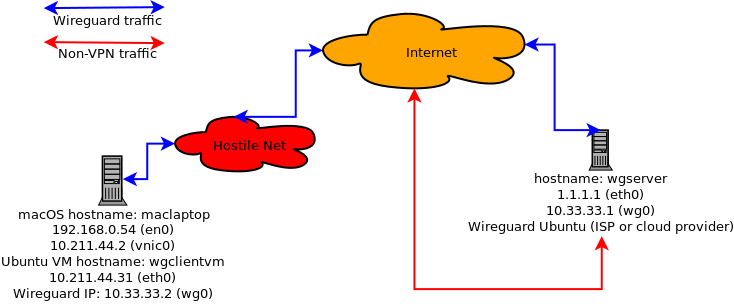 For the remainder of the writeup, head on over to the
github repository.
For the remainder of the writeup, head on over to the
github repository.
 The 2.6.7 release of fwknop is available for
download (or via the
github release tag).
This release adds significant support for running commands delivered by SPA packets via
'sudo' on the server, and this allows the powerful 'sudoers' syntax to filter commands
that remote users are allowed to execute.
The 2.6.7 release of fwknop is available for
download (or via the
github release tag).
This release adds significant support for running commands delivered by SPA packets via
'sudo' on the server, and this allows the powerful 'sudoers' syntax to filter commands
that remote users are allowed to execute.
 In other news, Jonathan and I will be giving a lengthy interview on
Single Packet Authorization with fwknop for the
FLOSS Weekly show organized by the venerable
Randal Schwartz
of perl fame. Tune in September 2nd at 11am Eastern time.
In other news, Jonathan and I will be giving a lengthy interview on
Single Packet Authorization with fwknop for the
FLOSS Weekly show organized by the venerable
Randal Schwartz
of perl fame. Tune in September 2nd at 11am Eastern time.
 After a long while without updates to the fwknop clients on Android or iOS, I'm
excited to announce that Jonathan Bennett
has developed an entirely new client for Android called Fwknop2. This
client adds significant features such as the ability to save configurations (including
both encryption and authentication keys), proper handling of base64 encoded keys, and
support for manually specified IP addresses to be allowed through the remote firewall.
Further, Fwknop2 integrates with
JuiceSSH
so that an SSH connection can seamlessly be launched right after the SPA packet is
sent. Finally, in an interesting twist, Fwknop2 will be able to read encryption
and HMAC keys via a QR code via the camera. The QR code itself is generated from
key material in --key-gen mode (which is currently available in the standard fwknop
client and will be available in the fwknopd server in the next release).
After a long while without updates to the fwknop clients on Android or iOS, I'm
excited to announce that Jonathan Bennett
has developed an entirely new client for Android called Fwknop2. This
client adds significant features such as the ability to save configurations (including
both encryption and authentication keys), proper handling of base64 encoded keys, and
support for manually specified IP addresses to be allowed through the remote firewall.
Further, Fwknop2 integrates with
JuiceSSH
so that an SSH connection can seamlessly be launched right after the SPA packet is
sent. Finally, in an interesting twist, Fwknop2 will be able to read encryption
and HMAC keys via a QR code via the camera. The QR code itself is generated from
key material in --key-gen mode (which is currently available in the standard fwknop
client and will be available in the fwknopd server in the next release).
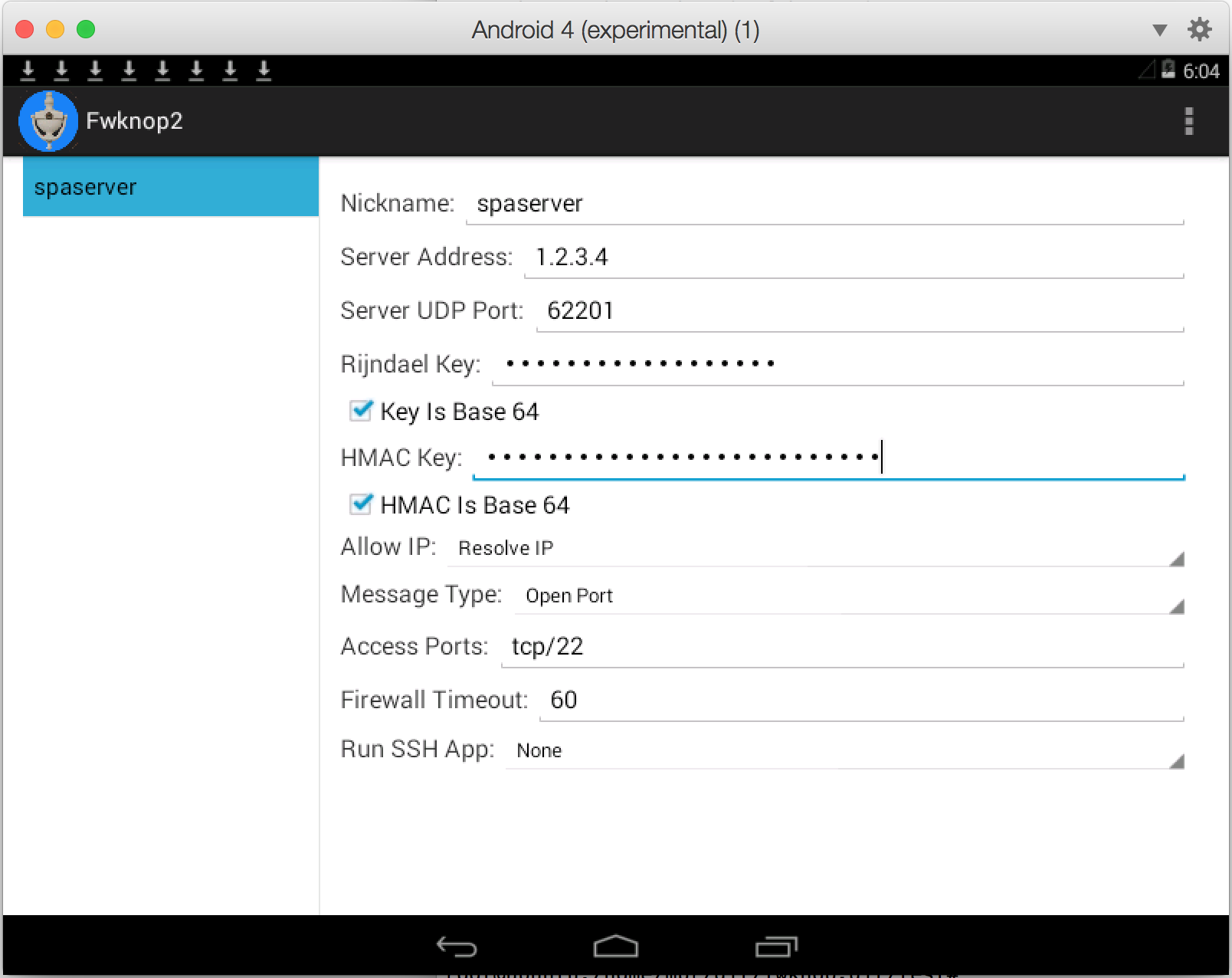
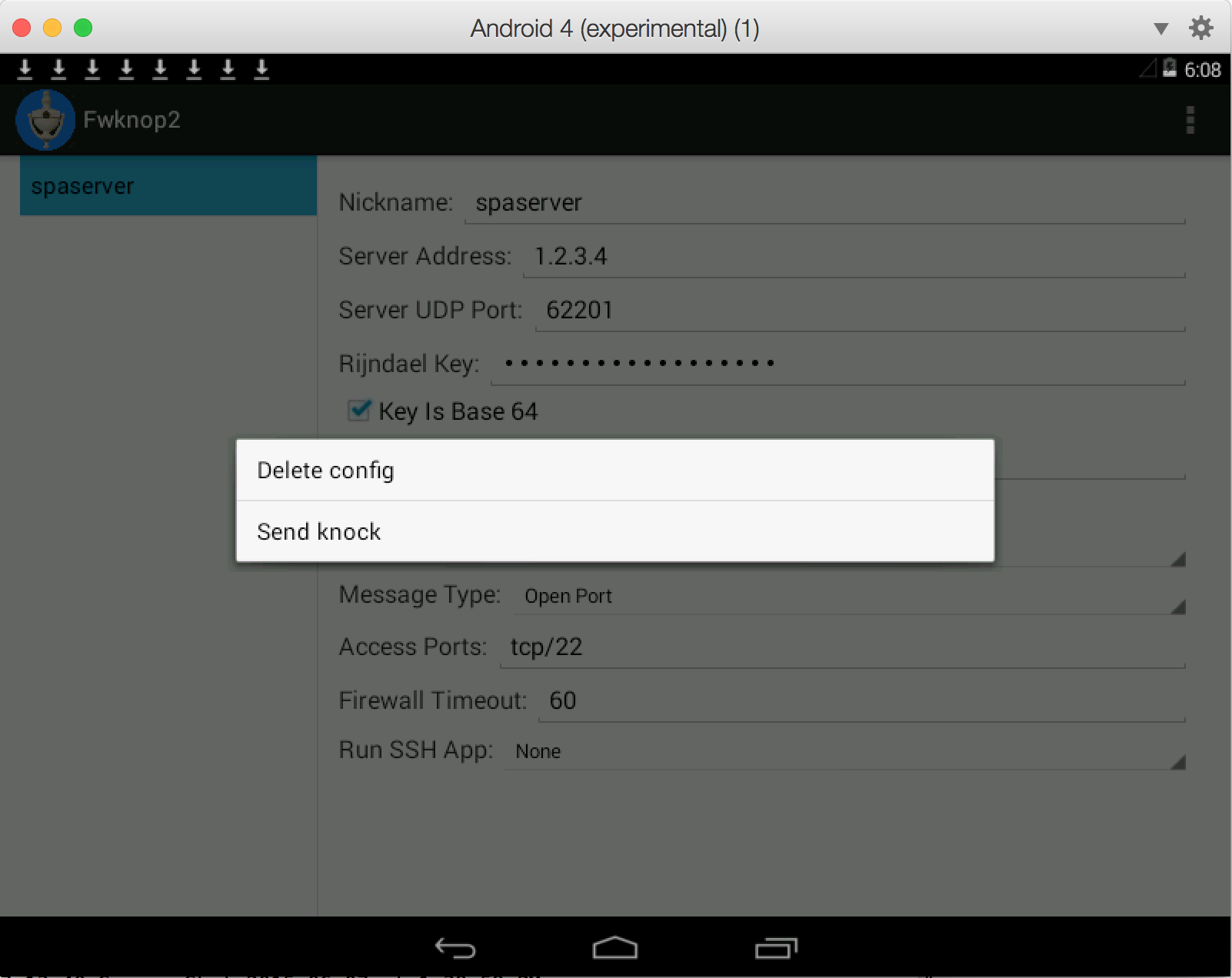
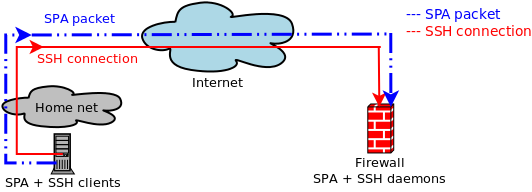 This works
well enough,
but both port knocking and SPA work in conjunction with a firewall, and "important" firewalls
are usually gateways between networks as opposed to just being deployed on standalone hosts.
Further, Network Address Translation (NAT) is commonly used on such firewalls (at least
for IPv4 communications) to provide Internet access to internal networks that are on
RFC 1918 address space, and also to allow external hosts access to services hosted on
internal systems.
This works
well enough,
but both port knocking and SPA work in conjunction with a firewall, and "important" firewalls
are usually gateways between networks as opposed to just being deployed on standalone hosts.
Further, Network Address Translation (NAT) is commonly used on such firewalls (at least
for IPv4 communications) to provide Internet access to internal networks that are on
RFC 1918 address space, and also to allow external hosts access to services hosted on
internal systems.
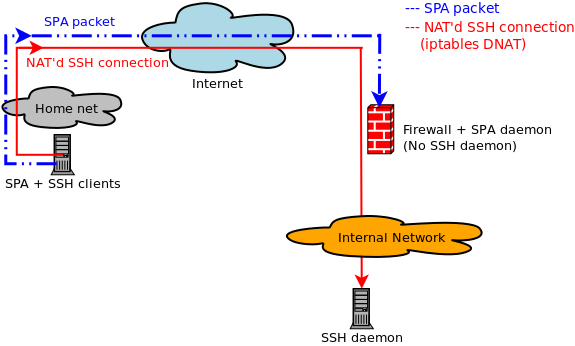
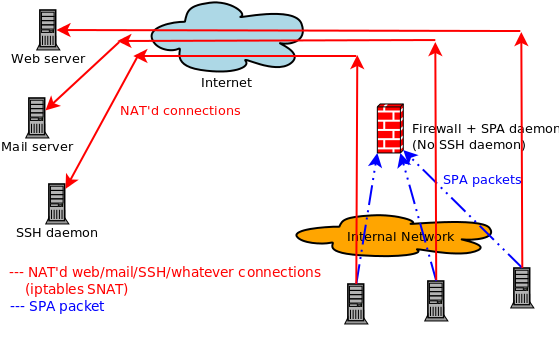
 Last week there was an interesting question
posed by Peter Smith
to the fwknop mailing list that focused on running fwknop in
UDP listener mode
vs. using libpcap. I thought it would be useful to turn this into a blog post, so here is Peter's
original question along with my response:
Last week there was an interesting question
posed by Peter Smith
to the fwknop mailing list that focused on running fwknop in
UDP listener mode
vs. using libpcap. I thought it would be useful to turn this into a blog post, so here is Peter's
original question along with my response:
 So, not terrible - currently 31 writes per second at the time the snapshot was taken, and that includes
OS X itself and the VM at the same time. But, now let's fire up AFL using the digest cache wrapper on
the Ubuntu VM (the main AFL text UI is not shown for brevity):
So, not terrible - currently 31 writes per second at the time the snapshot was taken, and that includes
OS X itself and the VM at the same time. But, now let's fire up AFL using the digest cache wrapper on
the Ubuntu VM (the main AFL text UI is not shown for brevity):
 Whoa, that's a massive difference - nearly two orders of magnitude. AFL has caused disk writes to spike
to over 2,700 per second with total data written averaging at 19.5MB/sec. Long term fuzzing at this
level of disk writes would clearly present a problem for the SSD - AFL frequently needs to be left running
for days on end in order to be thorough. So, let's switch everything over to use a RAM disk on the Ubuntu
VM instead and see if that reduces disk writes:
Whoa, that's a massive difference - nearly two orders of magnitude. AFL has caused disk writes to spike
to over 2,700 per second with total data written averaging at 19.5MB/sec. Long term fuzzing at this
level of disk writes would clearly present a problem for the SSD - AFL frequently needs to be left running
for days on end in order to be thorough. So, let's switch everything over to use a RAM disk on the Ubuntu
VM instead and see if that reduces disk writes:
 We're back to less than 10 writes per second to the SSD even though AFL is going strong on the Ubuntu
VM (not shown). The writes for the previous fuzzing run are still shown to the left of the graph (since
they haven't quite aged out yet when the screenshot was taken), and new writes are so low they don't
even make it above the X-axis at this scale. Although the total execs per second - about 2,000 - achieved
by AFL is not appreciably faster under the RAM disk, the main benefit is that my SSD will last a lot
longer. For those that don't run AFL underneath a VM, a similar strategy should still apply on the main
OS. Assuming enough RAM is available for whatever software you want to fuzz, just create a RAM disk and
run everything from it and extend the life of your hard drive in the process.
We're back to less than 10 writes per second to the SSD even though AFL is going strong on the Ubuntu
VM (not shown). The writes for the previous fuzzing run are still shown to the left of the graph (since
they haven't quite aged out yet when the screenshot was taken), and new writes are so low they don't
even make it above the X-axis at this scale. Although the total execs per second - about 2,000 - achieved
by AFL is not appreciably faster under the RAM disk, the main benefit is that my SSD will last a lot
longer. For those that don't run AFL underneath a VM, a similar strategy should still apply on the main
OS. Assuming enough RAM is available for whatever software you want to fuzz, just create a RAM disk and
run everything from it and extend the life of your hard drive in the process.
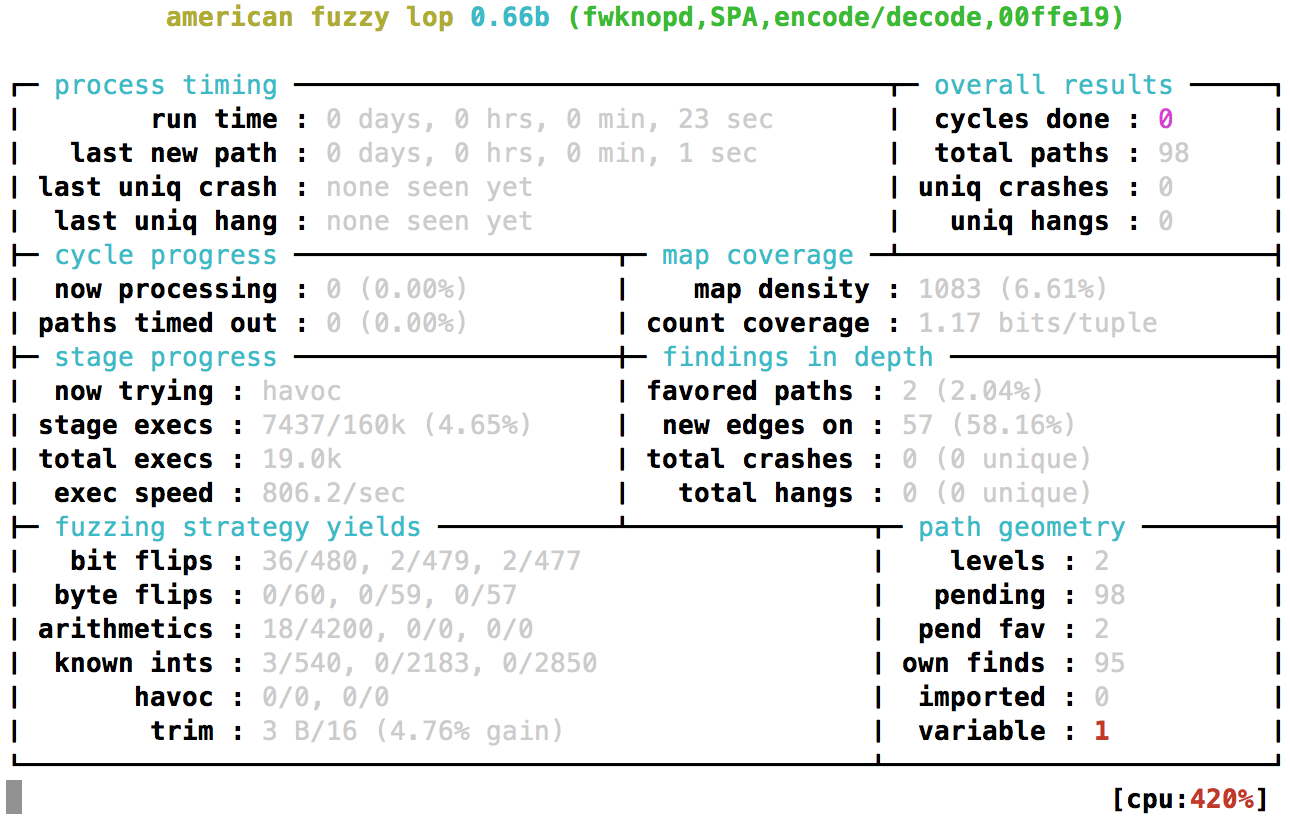 If the fuzzing run is stopped by hitting Ctrl-C, it can always be resumed as follows:
 I would encourage any open source project that is using Coverity to publish their
scan results. At last count, it appears that over 1,100 projects are using Coverity,
but OpenSSH is still not one of them.
I would encourage any open source project that is using Coverity to publish their
scan results. At last count, it appears that over 1,100 projects are using Coverity,
but OpenSSH is still not one of them.
 The fwknop project consistently uses valgrind
to ensure that memory leaks, double free() conditions, and other problems do not creep into the code base.
A high level of automation is built around
valgrind usage with the fwknop test suite, and a
recent addition
extends this even further by using the excellent CPAN
Test::Valgrind module. Even
though the test suite has had the ability to run tests through valgrind, previous to this change these
tests only applied to the fwknop C binaries when executed directly by the test suite. Further, some of the most
rigorous testing is done through the usage of the perl FKO extension to fuzz libfko functions, so
without the Test::Valgrind module these tests also could not take advantage of valgrind support. Now
that the test suite supports Test::Valgrind (and a check is done to see if it is installed), all fuzzing
tests can also be validated with valgrind. Technically, the fuzzing tests have been added as FKO built-in
tests in the t/ directory, and the test suite runs them through Test::Valgrind like this:
The fwknop project consistently uses valgrind
to ensure that memory leaks, double free() conditions, and other problems do not creep into the code base.
A high level of automation is built around
valgrind usage with the fwknop test suite, and a
recent addition
extends this even further by using the excellent CPAN
Test::Valgrind module. Even
though the test suite has had the ability to run tests through valgrind, previous to this change these
tests only applied to the fwknop C binaries when executed directly by the test suite. Further, some of the most
rigorous testing is done through the usage of the perl FKO extension to fuzz libfko functions, so
without the Test::Valgrind module these tests also could not take advantage of valgrind support. Now
that the test suite supports Test::Valgrind (and a check is done to see if it is installed), all fuzzing
tests can also be validated with valgrind. Technically, the fuzzing tests have been added as FKO built-in
tests in the t/ directory, and the test suite runs them through Test::Valgrind like this: